
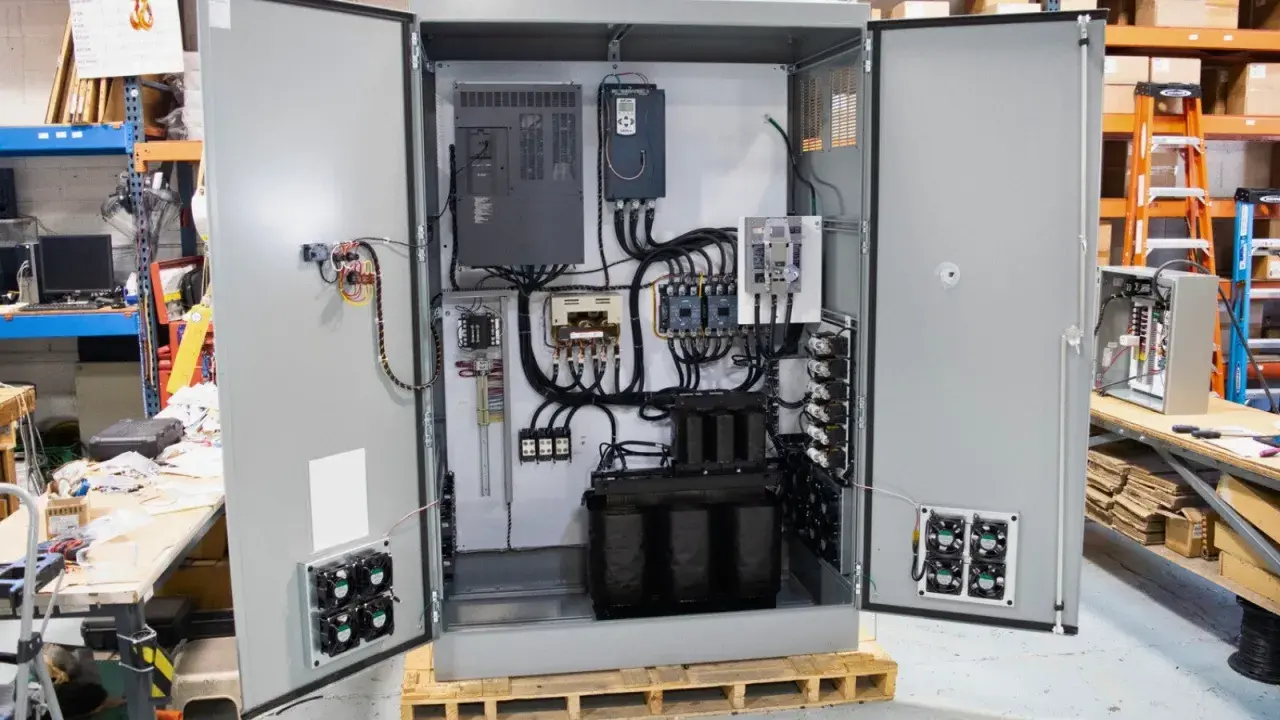
This guide to VFD drive cooling focuses on the decisions that matter on the floor: how much heat the drive really produces, which cooling method fits the enclosure, and what changes when the cabinet is sealed, dusty, hot, or cramped. I also cover the practical details that get missed most often, like airflow paths, ambient limits, altitude derating, switching frequency, and when a fan-based layout simply is not enough. The goal is simple: keep the drive inside its thermal envelope without overspending on cooling hardware.
The safest cooling strategy is the one that matches losses, enclosure quality, and site conditions
- Heat is the real design problem. A drive may look compact, but the losses still have to go somewhere.
- Do not size around motor power alone. Cabinet losses, braking resistors, ambient temperature, and altitude all change the answer.
- Fan and filter cooling is the simplest option. It works well only when the air stays clean and the cabinet can breathe.
- Sealed enclosures need a different plan. Heat exchangers, cabinet air conditioners, or liquid cooling become more attractive as contamination and heat rise.
- Maintenance is part of the cooling system. A clogged filter or failing fan can turn a decent design into an overtemperature trip.
Why drives heat up and when that heat becomes a problem
A variable frequency drive is not just a control device, it is a power conversion stage, and every conversion step creates heat. The rectifier, DC bus, and inverter all lose a little energy, and the total adds up once the drive starts switching current rapidly under load. In motion control, that matters more than many people expect, because acceleration, deceleration, and low-speed torque demand can push the thermal load well above what the motor nameplate suggests.
Switching losses are the hidden load
The faster the drive switches, the cleaner and quieter the output can be, but the extra switching frequency also increases internal losses. I often see people chase quieter operation first and only notice the thermal penalty later. That is a bad trade if the cabinet is already warm or the drive is mounted close to other heat sources.
Braking and duty cycle add heat outside the drive body
If the application uses dynamic braking, some of the energy leaves the motor and lands in a braking resistor, which is still a cooling problem even though it is not inside the drive enclosure. A stop-start conveyor, hoist, or servo-like motion profile can therefore create more cabinet heat than a steady-speed pump of the same power rating. In practice, the duty cycle is often more important than the motor size.
Once I look at the heat source honestly, the next question is not which fan looks strongest, but which cooling architecture actually fits the installation.

Which cooling method fits the application
I usually start with the simplest system that can still hold temperature, then I move up only when the enclosure or environment forces me to. That approach avoids unnecessary complexity, but it also stops me from underestimating the heat problem in sealed or dirty locations. The table below is the practical way I compare the main options.
| Cooling method | Best fit | Strengths | Trade-offs | My take |
|---|---|---|---|---|
| Internal fan with heatsink | Open or lightly enclosed installations with clean ambient air | Low cost, simple, common on standard drives | Depends on clean airflow and free clearance around the drive | Good first choice when the cabinet is not fighting dust or high ambient temperature |
| Cabinet fan and filter | Control panels that can breathe filtered air | Inexpensive and easy to service | Filters clog, airflow drops, and the cabinet is still open to ambient conditions | Works well in cleaner industrial spaces, less well in dusty plants |
| Heat exchanger | Enclosures that must stay sealed from the room | Keeps dirt and moisture out while moving heat away | More cost and more parts than basic ventilation | A strong middle ground when IP protection matters more than initial simplicity |
| Cabinet air conditioner | Hot rooms, high ambient temperature, or tightly packed cabinets | Controls cabinet temperature more aggressively | Higher energy use, condensate management, more maintenance | Useful when ambient conditions are the real problem, not just airflow |
| Liquid cooling | High-power drives, harsh environments, or very compact layouts | Moves heat out efficiently and reduces room cooling demand | Higher design effort, plumbing, leak management, and service discipline | Best when air cooling would force an oversized cabinet or too much cleaning |
ABB-style liquid-cooled designs are especially interesting in compact or harsh installations because they push the heat into a coolant circuit instead of dumping it into the cabinet air. That changes the whole layout: fewer air ducts, less dependence on room conditioning, and less sensitivity to airborne contamination. I would not choose it for every panel, but when the power density climbs, it becomes a very rational option.
The main mistake I see here is people picking a cooling method by habit. A fan-and-filter cabinet that works beautifully in a clean machine room can fail quickly in a dusty washdown area, and a sealed enclosure can look robust right up until the first summer heatwave. Once the architecture is chosen, the real job is sizing it correctly.
How I size airflow and cabinet thermal budget
For a first-pass estimate, I want two numbers: the heat being released inside the cabinet and the temperature rise I can tolerate. Schneider Electric guidance points to dedicated thermal-calculation software as the most accurate option, but I still keep a manual check in my pocket because it is fast and it catches obvious undersizing.
| Calculation | When I use it | What it tells me |
|---|---|---|
| Total cabinet losses | Always, before choosing a cooling method | How much heat the enclosure must remove |
| Sealed cabinet temperature rise | When the cabinet is effectively closed to the room | How much hotter the inside will run relative to ambient |
| Fan-cooled airflow sizing | When filtered ventilation is possible | The minimum airflow required to hold temperature |
| Thermal software | Final design, not just a quick estimate | A more complete answer because it includes cabinet wall losses and component layout |
A simple planning shortcut is to use the drive loss data if the manufacturer provides it. If not, Siemens' application handbook gives 3 percent of drive power as a rough placeholder for first-pass calculations. On a 15 kW drive, that is about 450 W of heat before you add braking resistors, contactors, or any other cabinet components. That sounds small until you realise it is enough to make a poorly ventilated panel run hot all day.
For a fan-cooled enclosure, the same handbook gives a practical formula: Trise = (0.053 x Ploss) / F, where Ploss is the internal heat in watts and F is airflow in m3/min. For a sealed cabinet, it gives Trise = Ploss / (5.5 x A), where A is the exposed cabinet surface area in m2. Those formulas are not a substitute for detailed design, but they are excellent for spotting unrealistic assumptions.
As a worked example, a cabinet dissipating 560 W needs roughly 73 m3/h of airflow in one of Schneider Electric's sizing examples. I like examples like that because they translate the problem into something measurable, not vague. Once the airflow number is known, the harder part is making sure the cabinet layout does not sabotage it.
From here, the next level of risk is not math but the physical details that cause a design to fail in the field.
The details that make or break reliability
Most cooling failures are not dramatic. They come from small mistakes that slowly erode thermal headroom until the drive starts tripping on hot days or after a few months of dust build-up. In the UK, I pay particular attention to damp plant rooms, summer rooftop plant, and sealed enclosures in food, water, and material-handling sites, because they often look mild on paper but behave differently in real life.Ambient temperature and altitude
I treat 40 C as the practical design baseline because many drives are specified there, even if a particular model can tolerate more under derating. That is the number I want in my head when I am checking the enclosure, not the absolute maximum buried in a brochure. Above that, you need the exact derating curve, not guesswork.
Altitude is another quiet derating factor. A Siemens handbook gives a useful example: 2000 m at 85 percent, 3000 m at 75 percent, and 4000 m at 65 percent of full load. That is not a universal rule for every drive, but it is a good reminder that thinner air removes heat less effectively. If a project is going into a hill site, a high-roof plant, or any elevated location, I check derating early instead of discovering it late.
Switching frequency and thermal headroom
Raising the switching frequency usually improves acoustic performance, but it also creates more heat inside the drive. Some drives will automatically reduce switching frequency to protect themselves if the cabinet temperature climbs too far. I would rather decide that trade-off in the design phase than let the drive decide it under load.
Read Also: VFD Output Reactors - When to Use Them (or Not)
Air path, cabinet layout, and contamination
The cabinet should move air in one direction with minimal recirculation. Hot exhaust should not be allowed to loop straight back into the intake, and the drive should not sit directly above a braking resistor, transformer, or other heat source. Clean access matters too, because a filter that cannot be reached will not be maintained. In dirty sites, I prefer a more sealed design over a high-maintenance filter that everyone forgets until the first trip.
- Keep inlet and outlet paths clear and separate.
- Leave the manufacturer's recommended clearance around heatsinks and fans.
- Keep braking resistors and other hot parts out of the same airflow path where possible.
- Use filters only if someone is actually responsible for replacing them.
- Think about condensation as well as dirt, especially in damp rooms and seasonal temperature swings.
The easiest way to avoid cooling surprises is to treat the cabinet as a thermal system, not a box with a fan attached. That perspective makes the final maintenance checks much more obvious.
What failure looks like before a trip happens
Cooling problems usually leave a trail before the drive shuts down. I look for the symptom pattern first, then I decide whether the issue is airflow, ambient conditions, component wear, or a design that never had enough margin in the first place.
| Symptom | What I suspect first | First check |
|---|---|---|
| Nuisance overtemperature trips after a dusty period | Clogged filter or weak cabinet airflow | Inspect the fan, filter media, and any blocked exhaust path |
| Drive is hot even when the motor load is moderate | Heat trapped in the enclosure | Check recirculation, cabinet layout, and nearby heat sources |
| Trips only in summer or with the cabinet door closed | Not enough cooling margin for ambient conditions | Compare actual cabinet temperature with the drive rating and derating curve |
| Fan noise increases or vibration appears | Fan bearings are wearing out | Replace the fan before it fails completely |
| Trips appear only at a higher switching frequency | Extra internal losses are eating the thermal margin | Reduce switching frequency or increase cooling headroom |
My maintenance rule is simple: do not wait for a trip to tell you that the cooling system is weak. If a filter is visibly dirty, a fan sounds tired, or the cabinet is hotter than expected, I treat that as an early warning, not an inconvenience. A few minutes of inspection usually costs far less than a production stop.
What I would verify before handing the panel over
- The drive ambient rating matches the real enclosure temperature, not the room temperature on paper.
- The cabinet losses have been calculated, including braking resistors and any other heat sources.
- The cooling method matches the environment, whether that is filtered ventilation, a heat exchanger, cabinet air conditioning, or liquid cooling.
- Clearance, airflow direction, and maintenance access are practical for the people who will actually service the panel.
- Altitude, dust, moisture, and seasonal temperature swings have been checked, not assumed away.
- Someone is responsible for filters, fan condition, and thermal inspections after commissioning.
When I choose cooling for a drive cabinet, I start with the simplest system that still respects the thermal limits, then I upgrade only when the site forces me to. That is usually the cheapest path to uptime, because it avoids both undercooling and the kind of overengineered panel that looks elegant on day one and becomes a maintenance burden by month three.
