
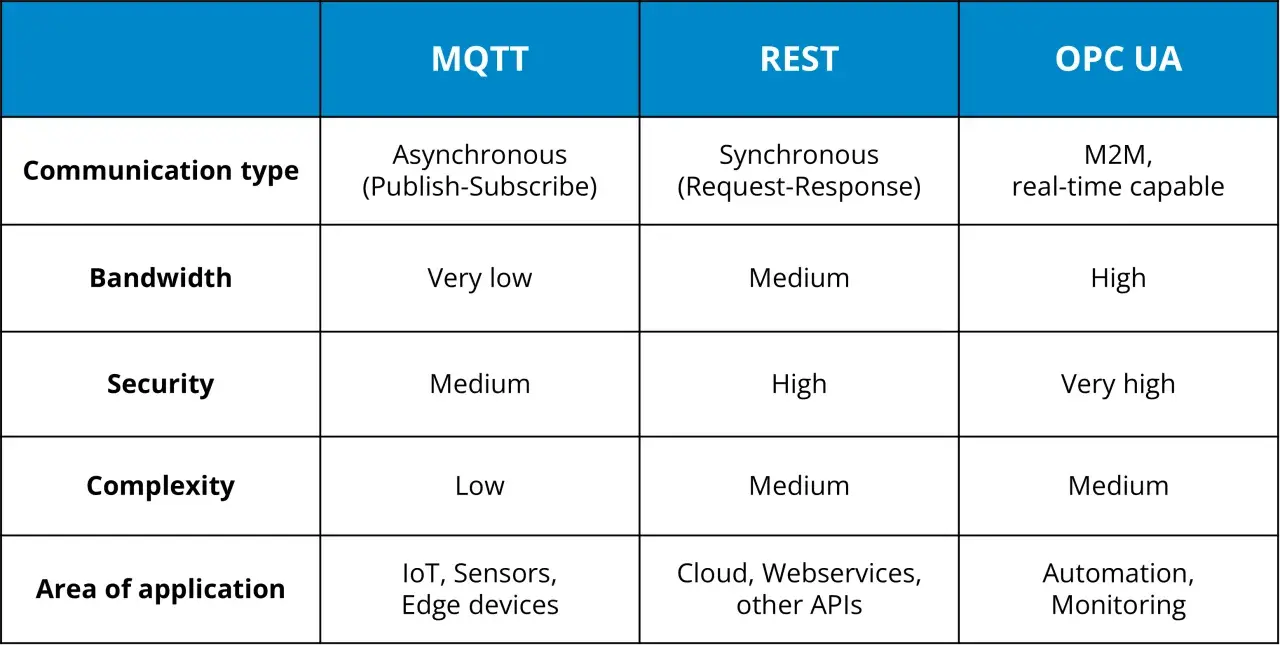
Industrial automation teams rarely choose between OPC DA and OPC UA in the abstract. They choose under pressure: keep a brownfield line stable, expose plant data to MES or cloud tools, or modernise without losing visibility. This article breaks down what each protocol does, why UA has become the safer long-term option, and where DA still makes sense in real networks. The practical choice behind opc ua vs opc da is less about buzzwords and more about how far data has to travel, who must secure it, and how much legacy Windows infrastructure you are willing to keep.
What matters most before you choose one protocol
- OPC DA is the classic, Windows-era data access specification focused on values, timestamps, and quality.
- OPC UA is a newer, platform-independent architecture with built-in security and a richer information model.
- For new industrial networks, UA is usually the better fit because it handles segmentation, remote access, and mixed environments more cleanly.
- DA still has a place in stable legacy plants where the cost and risk of change are hard to justify.
- Wrappers and gateways can bridge DA and UA during migration, but they do not remove the need for proper system design.
What OPC DA and OPC UA are really built for
The OPC Foundation’s Classic documentation defines OPC DA as the specification for exchanging values, time, and quality information. That is the simplest way to think about it: DA is a reliable way to read and write industrial tags, but it comes from a Windows-centric world built on COM/DCOM. In practice, I treat DA as a transport for process data, not as a full information architecture.
OPC UA was created later as the unifying layer. The OPC Foundation describes it as the migration path from Classic OPC and says existing DA, HDA, and A&E data can be mapped into UA. That matters because UA is not just a newer transport. It is a broader model that can expose data, events, methods, discovery, and richer structure in a way DA never tried to do.
So the core difference is not simply old versus new. DA is narrow and operational; UA is broader, more expressive, and designed for systems that need to grow beyond one Windows server. That distinction becomes much clearer when you look at networking and security.
Why OPC UA fits modern industrial networks better
UA wins in modern architectures because it was designed for the network realities of current plants: segmented OT zones, mixed operating systems, edge devices, remote support, and cloud-connected analytics. It is platform-independent, so you are not tied to a single Microsoft stack. It is also built with security in mind, which is a far bigger issue now than it was when classic OPC was first deployed.
| Criteria | OPC DA | OPC UA |
|---|---|---|
| Runtime model | Windows COM/DCOM | Platform-independent service architecture |
| Data model | Values, time, quality | Hierarchical address space, objects, methods, events |
| Security | Depends heavily on surrounding Windows and DCOM configuration | Built-in authentication, encryption, and auditing controls |
| Deployment range | Best suited to legacy Windows plants | Works across embedded devices, edge systems, and enterprise platforms |
| Long-term fit | Useful for maintaining existing systems | Designed as the future-facing standard |
The practical effect is simple: UA is easier to place in a segmented network, easier to extend into new applications, and easier to align with cybersecurity requirements. If you are designing a new packaging line, a multi-site utility network, or a plant data layer that has to reach analytics platforms, UA gives you far more room to work. That advantage matters even more when you compare it with the places where DA still survives.
Where OPC DA still earns its place
I would not dismiss DA as obsolete in every case. Plenty of plants still depend on it, and in a stable brownfield environment that can be a rational choice. If the HMI, historian, or SCADA layer is already built around classic OPC and the line is performing well, ripping out that stack can create more risk than value.
- Keep DA when the plant is Windows-only and the vendor ecosystem is already locked to classic OPC.
- Keep DA when the system is isolated, local, and unlikely to expand beyond its current network boundary.
- Keep DA when a shutdown window is short and the business case for a rewrite is weak.
- Keep DA when the real priority is continuity, not architectural elegance.
The catch is that DA’s usefulness usually shrinks as soon as the network grows more complex. The moment you need cross-site access, modern authentication, or integration with non-Windows systems, the legacy tradeoff becomes harder to defend. That is where migration planning starts to matter.
How to bridge a brownfield system without breaking production
The cleanest migration path is rarely a big-bang replacement. In mixed plants, I usually prefer a staged approach: preserve the working DA layer, then bridge it into UA where new applications need access. The OPC Foundation notes that classic data can be mapped into UA, and that is the right mental model here. You are translating the interface first, not redesigning the whole plant in one move.
- Use a wrapper when you need to expose an existing DA server through UA without touching the original server.
- Use a proxy or gateway when UA clients need to consume legacy data, or when DA clients must temporarily reach UA servers.
- Run both in parallel during the transition so production remains stable while applications move one by one.
- Retire the bridge later only after you have confirmed that the downstream applications no longer depend on classic OPC.
That approach works, but it is not magic. A wrapper can move data; it cannot fix a messy tag model, weak naming conventions, or a flat network design that was never meant to cross security zones. If you treat bridging as a temporary compatibility layer instead of a permanent architecture, the migration is much easier to control. The next question is what network conditions decide whether UA should sit at the centre from day one.
Networking factors that matter more than the protocol name
In industrial networking, the protocol choice is often less important than the route the data has to take. If the traffic stays inside one flat Windows subnet, DA can function acceptably for a long time. Once you introduce firewalls, routed segments, remote engineering, third-party maintenance, or cloud handoffs, UA usually becomes the safer and simpler option.
Here is the part many teams underestimate: neither OPC DA nor OPC UA should sit in the PLC scan path for hard real-time control. Control loops belong close to the machine. OPC is for data exchange, monitoring, supervision, and integration. If you try to use either protocol as a substitute for local control logic, you are solving the wrong problem.
UA is also a better fit when the network has to support more than one audience. A maintenance engineer, an MES platform, and a remote service provider all need different access patterns. UA’s security and modelling capabilities make that separation easier to manage. That matters a great deal in UK manufacturing estates where old equipment, new analytics, and strict change windows often coexist in the same site.
So when I evaluate a project, I do not start by asking which protocol is newer. I ask how many zones the data must cross, who will administer the connections, and how much of the network is expected to change in the next five years. Those answers usually point to the right stack.
A practical rule for choosing the right stack in 2026
My rule of thumb is straightforward: choose UA for anything that has to survive beyond the current control cabinet, and keep DA only where legacy continuity is the main constraint. If the project is greenfield, multi-vendor, or expected to connect to edge and cloud services, UA should be the default. If the plant is heavily invested in classic Windows tooling and the upgrade window is too risky, DA can stay in place behind a wrapper or gateway.
| Situation | Better fit | Why |
|---|---|---|
| New machine or new production line | OPC UA | Better security, wider device support, richer model from the start |
| Existing Windows-based plant with stable DA clients | OPC DA short term | Lowest disruption while keeping production unchanged |
| Mixed legacy and modern systems | UA with a DA bridge | Lets you migrate in stages instead of all at once |
| Remote access, multi-site, or cloud-connected data flow | OPC UA | Easier to secure and manage across network boundaries |
If you remember one thing, make it this: DA is a classic interoperability layer for legacy Windows environments, while UA is the architecture you build around when you want the network to scale, harden, and evolve. For most new industrial projects, UA is the better long-term choice. For most brownfield migrations, the right answer is often both, used deliberately and for a limited time.
