
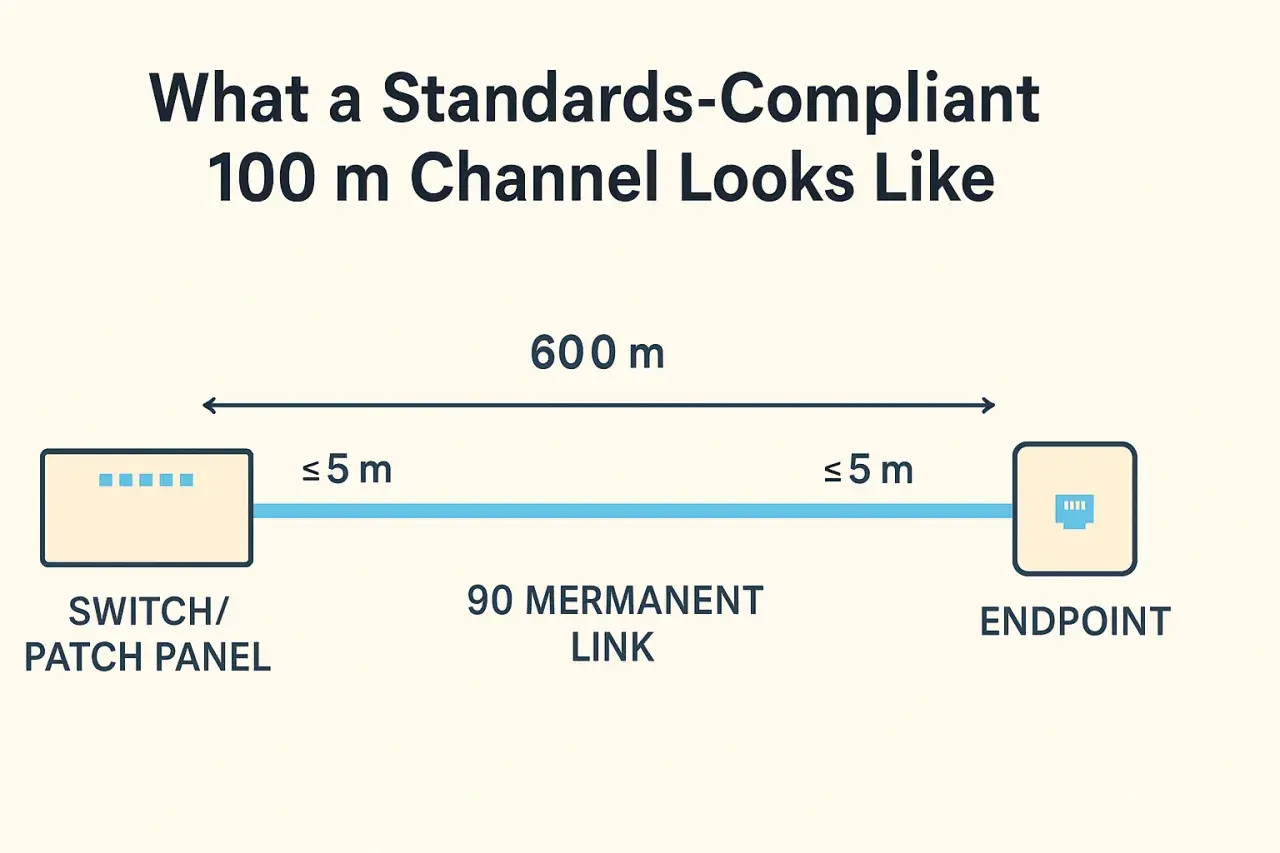
A standard copper Ethernet link is 100 metres end to end, and the details decide whether it will stay reliable
- 100 metres is the usual channel budget for twisted-pair Ethernet, not just the in-wall cable.
- The common split is 90 m of permanent link plus 10 m of patch cords across both ends.
- For new 10 Gigabit copper runs, Cat6A is the safest choice at full distance.
- Cat8 is for short 25/40GbE copper links, not long building runs.
- Heat, bends, poor termination, and electrical noise can reduce real-world margin long before a cable looks “too short”.
- If you need more distance, fibre, an active extender, or a local switch is usually a better answer than stretching copper.
What the 100 metre rule actually covers
I treat Ethernet distance as a channel budget, not a loose guideline. In a typical structured cabling setup, the standard allowance is 90 metres for the permanent link and up to 10 metres for patch cords at both ends combined. That means the cable between the patch panel and the outlet is only part of the picture; the jumpers at the rack and at the device also count.
This is where a lot of people get caught out. A run that looks like “just 85 metres” on a floor plan can quietly become a 102-metre channel once you add patch leads, service loops, and a few extra metres of routing around trays or cable baskets. For a UK office or plant floor, I would always design with a little slack in hand rather than aiming to land exactly on the edge of the spec.
The same rule also explains why a cable can test fine on the bench but fail after installation. Once you include the full end-to-end channel, the margin can be much smaller than it first appears. That leads straight into the physics behind the limit.

Why the limit exists in the first place
Twisted-pair Ethernet loses margin as distance increases because the signal gets weaker and less distinct over time. The main issues are insertion loss (attenuation), crosstalk between pairs, and propagation delay skew, which is the mismatch in timing between pairs inside the same cable. Put simply, the longer the run, the harder it is for the receiver to interpret the data cleanly.
That is also why installation quality matters so much. A cable that is crushed in a tray, bent too tightly, or terminated badly can perform worse than a longer but carefully installed run. In industrial environments, heat adds another layer of stress: higher ambient temperature and cable bundling can reduce usable headroom, so the theoretical limit is not always the practical one.
Noise matters too. Motors, drives, welding equipment, and dense power distribution do not directly change the standard, but they do eat into your safety margin. If I am planning a network for a manufacturing line or a warehouse with heavy electrical equipment, I assume the cabling needs more discipline, not less.
Which cable category fits each speed
For day-to-day planning, the category matters more than people expect. The cable type does not just affect speed; it affects how much distance margin you have and how forgiving the link will be when the installation is less than perfect.
| Cable type | Best use | Practical reach | What I would expect from it |
|---|---|---|---|
| Cat5e | 1G office and many IoT endpoints | Up to 100 m | Still widely used, especially where 1 Gigabit is enough and the cable plant is already in place. |
| Cat6 | 1G links and some multigigabit upgrades | Often fine at 100 m for 1G; 10G is usually shorter | Good for moderate upgrades, but I would not choose it as my default for new 10G planning. |
| Cat6A | Modern copper backbone for access and edge devices | 100 m for 10GBASE-T | The safest all-round choice when you want copper, PoE, and room to grow. |
| Cat8 | Short 25/40G data centre links | 30 m channel | High performance, but not a solution for long building runs. |
If I had to make one conservative recommendation for new UK industrial or smart-building work, it would be Cat6A unless there is a very specific reason to choose something else. It gives you enough headroom for 10GBASE-T, keeps PoE planning sane, and avoids painting the installation into a corner. The next question, naturally, is what to do when even a good copper design is not long enough.
How to go beyond 100 metres without creating a maintenance problem
When a link needs to reach farther than copper comfortably allows, I look at three realistic options.
- Fibre is the cleanest answer for long distance, electrical isolation, outdoor links, and noisy areas. It removes copper’s distance and interference constraints, but it needs the right optics and termination skills.
- An active extender or media converter can solve a single point-to-point problem when replacing the whole path would be expensive or disruptive. The trade-off is another powered device to manage and troubleshoot.
- A local switch or cabinet move is often the best operational fix in factories and warehouses. If several endpoints live in the same zone, it is usually smarter to bring the network closer than to over-stretch one run.
There is one trap I see often: people try to “make copper work” by shrinking patch leads, skipping testing, or hoping auto-negotiation will hide the problem. It usually does not. If the link is beyond spec, the failure may be intermittent, speed-dependent, or PoE-sensitive, which is exactly the sort of issue that wastes time during commissioning.
For endpoint-heavy sites, especially industrial automation and IoT deployments, the best decision is often a network design decision rather than a cable decision. Shorter copper plus a nearby switch is frequently easier to support than one heroic long run.What I check before I blame the cable
When a copper Ethernet link misbehaves, I work through the basics before I start replacing hardware. In practice, a surprising number of “distance” issues are really installation issues.
- Measure the full channel, not just the exposed cable route.
- Check patch leads at both ends, because they count toward the channel budget.
- Verify terminations for split pairs, untwisted conductors, and poor punch-downs.
- Look for physical stress such as tight bends, crushed sections, or cable ties pulled too hard.
- Test under realistic conditions, especially if the link also carries PoE.
- Watch the environment for heat, bundling, vibration, and electromagnetic noise.
That last point matters more than many people expect. A link that passes in a cool comms room can behave differently once it is routed across a warm production area or bundled with power cabling. If the installation is marginal, the symptoms may show up only when the equipment is under load, which makes the fault look random when it is not.
The design rule I would use for a new industrial network
If I were planning a new office, warehouse, or smart-factory network in the UK, I would start with a simple rule: design copper for 90 metres of permanent link, reserve headroom for patching, and choose Cat6A when you want the installation to stay useful for longer. That approach keeps the channel inside the standard, gives you better odds with PoE and multigigabit access, and avoids last-minute redesigns when the floor layout changes.
When the endpoint is genuinely too far away, I would not force copper to do a job that belongs to fibre or an active intermediary. That is usually the cheaper choice over the life of the network, even if it feels less convenient on day one. The cleanest installations are rarely the ones that push a cable to its limit; they are the ones that leave enough margin to survive real-world conditions.
For most networks, the answer is not to hunt for a loophole around the standard. It is to design the channel properly, test it properly, and switch media when the distance says copper is no longer the right tool.
