
Key points that usually decide the choice
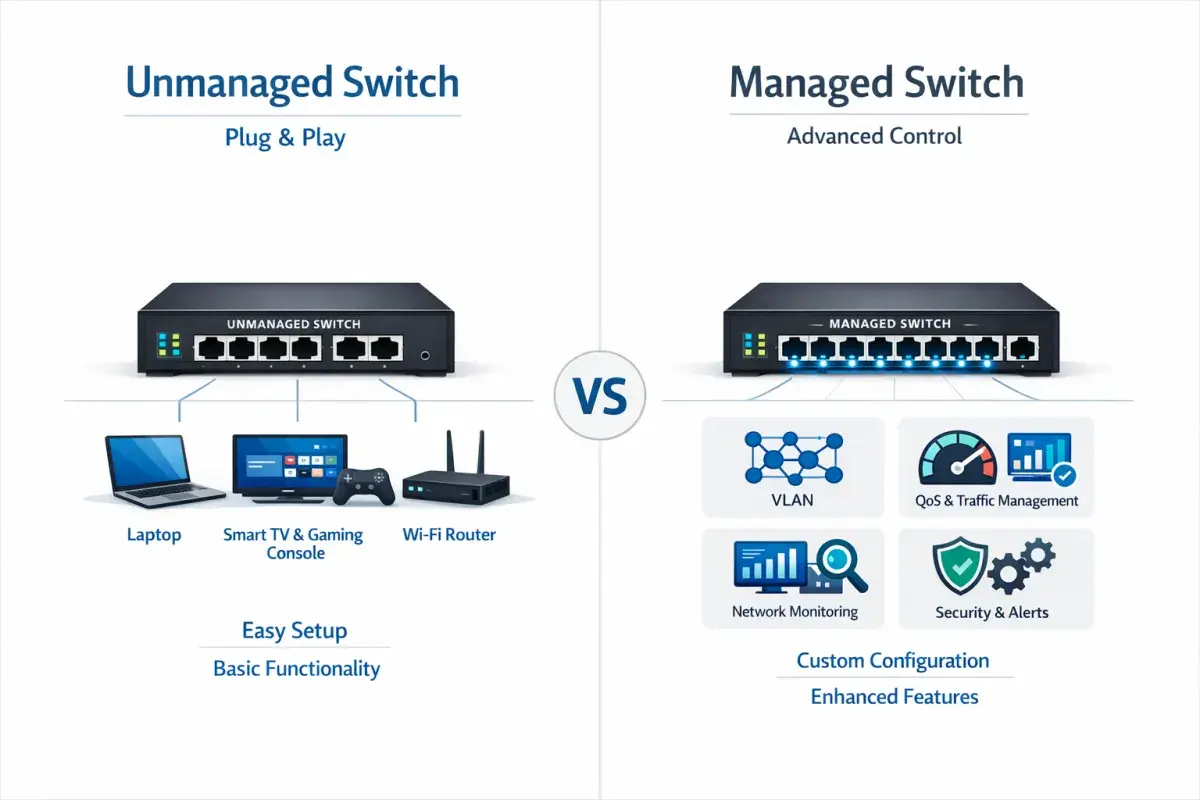
- Managed switches add VLANs, QoS, monitoring, security controls, and often redundancy features.
- Unmanaged switches are plug-and-play, cheaper, and fine when you only need more Ethernet ports.
- In small, isolated setups, unmanaged is usually enough; in shared or critical networks, managed is usually the safer call.
- For UK buyers, rough street prices often start around £10-£30 for basic unmanaged units and £40-£150+ for entry-level managed or smart-managed models.
- In industrial environments, the enclosure, temperature range, PoE budget, and fibre uplinks can matter as much as the management features.
- If you are unsure, a smart-managed or web-managed switch is often the middle ground I check first.
Why switch management matters more in industrial networks
A network that only carries office traffic can tolerate a lot of blunt design. A production network cannot. Once you add PLCs, HMIs, vision systems, access points, IP cameras, sensors, and remote support tools, the switch stops being a passive box and becomes part of your operational risk.
That is why I treat switch management as more than a convenience feature. A managed switch lets me separate traffic, watch for errors, and react before a small issue becomes a line stoppage. If a broadcast storm, cable fault, or accidental loop appears, I want the switch to help me see it quickly rather than hide it behind blinking LEDs.
In industrial automation, that difference is not academic. It is the difference between a network that can be diagnosed in minutes and one that turns into a site visit, a guess, and lost production time. Once you see that, the feature gap becomes much easier to judge.What a managed switch adds beyond basic forwarding
A managed switch does much more than pass frames from one port to another. The practical value comes from the control plane: the tools that let you shape, inspect, and protect traffic instead of just moving it around.
Here is the short version of what usually matters most:
- VLANs separate traffic logically on the same physical switch, which is useful when control, guest, camera, and office devices should not all sit on one flat network.
- QoS (quality of service) prioritises traffic so time-sensitive data such as voice, alarms, or control packets is less likely to wait behind large file transfers.
- Port mirroring copies traffic from one port to another, which makes packet capture and troubleshooting far easier.
- SNMP (Simple Network Management Protocol) gives remote monitoring, counters, alerts, and trend data that unmanaged switches simply do not provide.
- Port security and access controls help restrict who or what can connect, which matters when contractors, visitors, and temporary devices share the same site.
- RSTP/STP helps prevent loops, which is a real issue when someone patches a cable incorrectly or adds a redundant path without planning it.
- Link aggregation combines ports for more bandwidth or resilience between switches and servers.
- PoE management lets me monitor and sometimes power-cycle powered devices such as cameras and access points without visiting the cabinet.
Not every managed switch includes every feature, and not every site needs all of them. That is why I always check the actual feature list rather than assuming the word “managed” tells the whole story. Some web-managed or smart-managed models cover the essentials without the full complexity of a large enterprise switch. That middle layer is often where the most sensible value sits.
Where an unmanaged switch still makes sense
I would not dismiss unmanaged switches. They are still the right answer when the network is small, self-contained, and easy to live with if something breaks. If you only need to add ports at a desk, in a lab, in a conference room, or inside a single machine cell with no segmentation requirements, plug-and-play is a feature, not a weakness.
The appeal is simple: low cost, almost no setup, and very little to misconfigure. Many small unmanaged switches are fanless and silent, which is helpful in offices, control rooms, and light industrial spaces. If the job is just “give me more Ethernet ports,” unmanaged is often the cleanest choice.
That said, unmanaged switches have hard limits. They do not give you VLANs, visibility, remote diagnostics, or meaningful traffic controls. If the network later grows into cameras, voice, multiple departments, or production-critical devices, you may end up replacing hardware that still works perfectly fine. That is why I only choose unmanaged when I am confident the network will stay simple.

The differences that matter for uptime, security, and troubleshooting
| Criterion | Managed switch | Unmanaged switch | Why it matters in practice |
|---|---|---|---|
| Setup | Requires configuration through a web UI, app, or CLI | Plug-and-play | Managed takes longer to deploy, but gives you control over the network design |
| Visibility | Port stats, logs, alerts, and often SNMP | Usually only link LEDs and basic status | Visibility shortens troubleshooting time when something drops off the network |
| Traffic control | VLANs, QoS, multicast controls, link aggregation | Basic forwarding only | Important when cameras, voice, IoT data, and office traffic share the same cabling |
| Resilience | Often supports RSTP/STP and recovery features | Usually none | Useful for preventing loops and keeping the network stable during changes |
| Security | May include port security, ACLs, and authentication controls | No real access control | Helpful when you need to limit who can connect to the network |
| Typical UK price | About £40-£150+ for entry-level managed or smart-managed models; more for industrial and PoE hardware | About £10-£30 for basic small-form-factor gigabit models | The gap widens quickly with PoE, fibre uplinks, DIN-rail mounting, and ruggedised enclosures |
If you look at current UK retail shelves, that spread is easy to see. Basic unmanaged 5- to 8-port gigabit boxes often sit in the low tens of pounds, while web-managed or smart-managed models move up once VLANs, PoE, or fibre uplinks are added. Industrial units, especially the ones built for wider temperatures, DIN-rail mounting, or harsh cabinets, can climb much higher. From there, the choice becomes less about price alone and more about how expensive a network mistake would be.
How I would choose for common real-world setups
Single-purpose machine cells and test benches
If a cell only needs a few endpoints and nothing on that segment has to be isolated from anything else, I am comfortable with an unmanaged switch. It keeps commissioning fast and leaves fewer settings to document. If the bench will later be reused for diagnostics, demos, or remote support, I would lean smart-managed instead, because the extra visibility often pays for itself the first time something odd happens.
IP cameras, access points, and voice devices
Once PoE devices enter the picture, I start wanting management. VLANs can separate surveillance traffic from operational traffic, QoS can protect voice, and PoE controls let me restart a camera or AP without pulling a cable. This is one of those cases where unmanaged looks cheaper until the first troubleshooting session goes badly. Then the “saved” money vanishes.
Production lines and plant backbones
For production lines, I would normally specify managed. I want RSTP or an equivalent loop-prevention design, I want the ability to segment traffic, and I want logs when the network behaves badly. If the switch is carrying traffic between cabinets, I would also look closely at SFP or fibre uplinks, because copper alone is not always the right answer over longer runs.
Read Also: Industrial Ethernet Ring Topology - Design for Uptime
Harsh industrial cabinets
In a harsh environment, management features are only half the story. I would also look for DIN-rail mounting, rugged connectors, wide operating temperatures, and the right ingress protection rating. A beautifully managed switch is still the wrong choice if it cannot survive the cabinet it is installed in. That is a mistake I still see when the purchasing conversation is driven only by port count and not by the site conditions.
The purchase mistakes I see most often
- Buying unmanaged because it is cheaper, then discovering later that VLANs, monitoring, or remote access are needed.
- Buying managed and never configuring it, which means paying for features that never become useful.
- Ignoring the PoE budget, so the switch has enough ports but not enough power for all connected devices.
- Forgetting uplinks and fibre requirements, especially when switches sit in different cabinets or across floors.
- Choosing office hardware for a factory enclosure without checking temperature, vibration, or mounting requirements.
- Assuming every managed switch is the same, when in reality the difference between web-managed, smart-managed, and fully managed can be significant.
Most of these mistakes come from treating the switch as a commodity rather than a design choice. The hardware may be small, but the consequences of a bad fit are not. That is why I always map the network job first and buy the hardware second.
What I would specify first on a new plant or IoT network
If I were building a new industrial or connected-facility network in 2026, I would start with one simple question: does this segment need to be visible, segmented, or recoverable without a site visit? If the answer is yes, I would lean managed. If the answer is no and the switch is only extending a small, isolated network, I would keep the design simple and choose unmanaged.
My rule of thumb is straightforward. Use unmanaged when the network is genuinely basic. Use managed when downtime, segmentation, or remote troubleshooting has real value. And if you are sitting between the two, a smart-managed or web-managed model is usually the compromise I would inspect first. That gives you enough control to avoid the worst blind spots without forcing enterprise complexity into a small deployment.
The real trap is not the switch type itself; it is buying the wrong level of management for the job. If I were specifying hardware for a factory cell, a camera network, or an IoT rollout today, I would treat unmanaged as the exception and managed as the baseline whenever traffic crosses devices, teams, or cabinets.
