
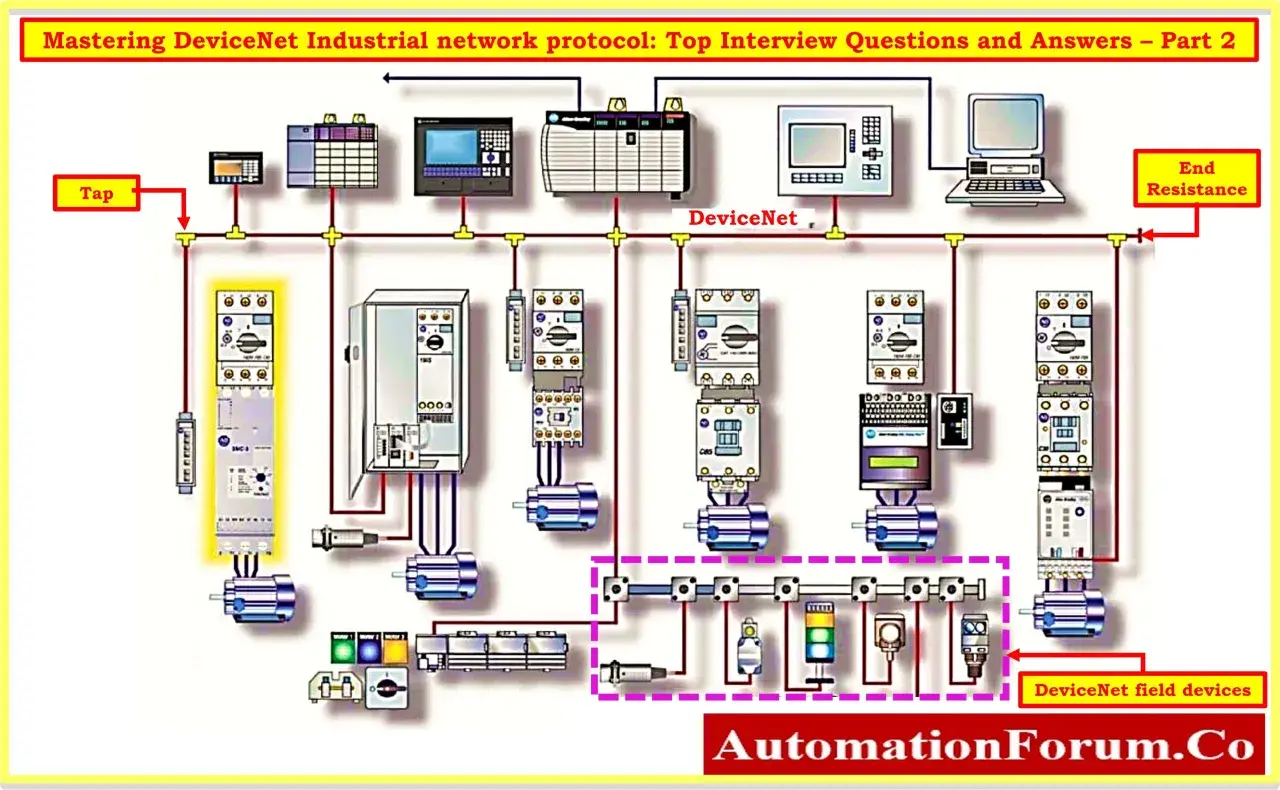
DeviceNet is a compact industrial networking standard that was built to replace messy point-to-point wiring between controllers and field devices. It carries communication and power over the same cable, which is why it became so useful in cabinets full of sensors, valves, drives and remote I/O. In this article I explain how the protocol works, where it still fits in 2026, and what usually matters when you have to support or migrate an installed system.
The practical facts you need first
- DeviceNet is a CIP-based fieldbus that runs over CAN, not Ethernet.
- It supports up to 64 nodes and baud rates of 125, 250 and 500 kbps.
- The cable can carry both data and 24 Vdc power, which simplified device-level wiring.
- Its usual topology is trunkline-dropline, with rugged round or flat cabling options.
- It is still useful in legacy automation, retrofit work and bridge-based hybrid systems.
- For new plant designs, industrial Ethernet usually has the wider fit and longer-term headroom.
What DeviceNet is and why it was built
I think the cleanest way to describe DeviceNet is this: it is a device-level industrial network designed to let controllers talk to simple field devices without a separate wire for every signal. Instead of running a cabinet full of discrete conductors to every sensor, solenoid and I/O block, the protocol lets those devices share one communication backbone.
Technically, DeviceNet sits in the CIP family and uses CAN at the data link layer. That matters because CAN gives it a proven, noise-tolerant serial foundation, while CIP adds the application behaviour industrial automation needs. The result is a network that can handle control, configuration and diagnostics without forcing every device into a different communication style.
ODVA still lists DeviceNet among the CIP networks, but in practice I treat it as a mature installed-base protocol rather than a greenfield default. That distinction is important: DeviceNet was built to solve wiring and device-connection problems at the machine level, not to compete with modern Ethernet for plant-wide data movement. Once that architecture is clear, the cabling choices make much more sense.
How the network is wired and powered
Trunkline and drop line layout
DeviceNet is usually deployed as a trunkline-dropline network. The trunk carries the main communications path, and short drop lines connect individual devices to that backbone. In practical terms, that means a machine builder can add or replace nodes without redesigning the whole cabinet, which is one of the reasons the protocol earned a reputation for being installation-friendly.
The physical media is not limited to one style. Round cable is common for rugged plant-floor work, while flat media exists for lighter-duty or more compact installations. You also see connector choices that reflect the environment: IP20-style terminations inside panels and IP67-style connections where the network has to survive harsher conditions. Once you see the layout, the next question is how power and signalling share the same cable.
Power and signalling on one cable
One of DeviceNet’s most practical features is that it can carry both data and 24 Vdc power on the network cable. According to the standard’s published guidance, the cable can supply up to 8 amps, which is enough to simplify many low-power device installations. That reduces separate wiring runs, makes panel builds cleaner and can cut the amount of time spent tracing faults.
The trade-off is that you still have to respect the power budget. If the cable run is too long, the current draw is too high or the taps are poorly planned, you start to see voltage drop, device resets and intermittent comms faults. DeviceNet is convenient, but it is not forgiving of sloppy electrical design.
Connectors and installation choices
Good DeviceNet installations are usually the result of disciplined cabling, not magic. The network supports different connector styles, and the right choice depends on whether you are inside a controlled cabinet, on a machine frame or exposed to vibration, oil and washdown. I would always treat the physical layer as part of the design, not an afterthought.
That is also why DeviceNet stayed popular in factories that wanted a tougher alternative to loose discrete wiring. Once the physical layer is understood, the messaging model becomes the next thing worth unpacking.
How communication moves across the bus
DeviceNet does not behave like office Ethernet. It uses a communication model that is better suited to automation devices that need predictable exchange of small amounts of data rather than huge packets of information. The protocol supports controller/device architectures as well as distributed control, and it can run peer-to-peer communication where devices interact without every message being routed through a single bottleneck.
Producer-consumer messaging
One of the strengths of CIP-based networks is the producer-consumer model. Instead of thinking only in terms of one device asking another for data, you can think of one node publishing information and others consuming it when needed. That makes network traffic more efficient and helps keep the bus useful for multiple devices at once.
I/O and explicit messaging
DeviceNet supports both I/O messaging and explicit messaging. I/O data is the cyclic traffic used for control tasks, while explicit messaging is used more for configuration, diagnostics and device-specific parameters. In real life, that split matters because it keeps routine control traffic separate from the slower, more deliberate work of setting up and troubleshooting devices.
Read Also: IO-Link Safety: Trustworthy Networks in Industrial Automation
QuickConnect and device changes
QuickConnect is another useful feature, although support depends on the device and system design. It shortens the time needed to reconnect a device while the network is running, which is handy on moving equipment and tool-changing applications. I would not present QuickConnect as a universal fix, but when it is supported properly it can reduce downtime in a very practical way.
The important point is that DeviceNet was never just a cable standard; it was a communication model built around low-level automation devices. That is exactly why it still has a place in certain systems today.
Where DeviceNet still makes sense
In 2026, I would usually expect to find DeviceNet in one of three places: legacy machines that are still earning their keep, retrofit projects that need to preserve an installed base, or compact device islands where the benefits of integrated power and signalling still outweigh the appeal of a full Ethernet stack. It remains especially familiar in discrete manufacturing, packaging, automotive equipment, and small collections of sensors, valves, drives and remote I/O.
Its strengths are not abstract. DeviceNet is good when you need a simple, rugged, low-level network with modest bandwidth needs and a lot of small devices. It is less attractive when the job is to feed large volumes of data into analytics platforms, connect with IT systems or support broader IIoT and cyber requirements.
For me, that is the real distinction: DeviceNet is still valuable when it solves an immediate wiring and control problem better than anything else on the table. It becomes less compelling when the system needs to behave like part of a wider digital plant architecture. That is where the comparison with EtherNet/IP becomes useful.
How it compares with EtherNet/IP
| Characteristic | DeviceNet | EtherNet/IP |
|---|---|---|
| Underlying transport | CAN with CIP on top | Standard Ethernet with TCP/IP and UDP plus CIP |
| Typical bandwidth | 125, 250 or 500 kbps | Far higher, depending on the Ethernet infrastructure and device class |
| Topology | Trunkline-dropline | Star, linear and device-level ring options |
| Power on the network cable | Yes, up to 24 Vdc and 8 amps | Not normally as part of the communication cable |
| Best fit | Device-level control, legacy equipment, compact machine islands | Plant-wide connectivity, IIoT, broader integration and scalable architectures |
| Current role | Installed base and retrofit work | Modern default for new industrial architectures |
The practical takeaway is straightforward. DeviceNet wins when wiring simplicity, deterministic device-level control and installed-base continuity matter more than bandwidth. EtherNet/IP wins when you need scale, easier integration with modern systems and a longer runway for digital manufacturing. Because both sit in the CIP family, bridging between them is often more practical than starting from scratch.
That still leaves one very real topic: what goes wrong in the field when DeviceNet stops behaving.
The mistakes that cause most DeviceNet problems
When I troubleshoot DeviceNet, I rarely start with software. I start with the physical and addressing basics, because that is where most faults hide. The following issues account for a lot of avoidable downtime:
- Duplicate node addresses, usually caused by bad commissioning or swapped devices.
- Wrong baud-rate settings, which can make a device appear dead even when it is wired correctly.
- Poor termination or loose connectors, especially in vibrating environments.
- Undersized power budgets, where the bus cannot hold voltage under load.
- Length and topology mistakes, especially when the trunk and drop layout is pushed beyond what the design can support.
- Assuming every device behaves the same way, when in reality messaging features and diagnostics can vary by vendor and model.
My rule of thumb is simple: check power, address, termination and cable integrity before you chase application logic. In many cases, that sequence finds the fault faster than any deep dive into controller code. Once those basics are clear, deciding whether to keep a line, bridge it or migrate it becomes much easier.
What I would check before keeping a DeviceNet line in service
Before I decide to keep DeviceNet in place, I ask a few blunt questions. Is the network stable? Are the spare parts still available? Is the line serving a real device-level purpose, or is it only staying alive because nobody has prioritised the migration? Those answers usually tell me whether the network is an asset or a liability.
- Check whether the line is already cleanly documented and easy to support.
- Confirm that replacement devices, adapters and gateways are still obtainable.
- Review whether faults are caused by age, vibration or poor cabling rather than by the protocol itself.
- Decide whether an EtherNet/IP bridge would reduce maintenance risk without forcing a full rip-and-replace.
- Keep DeviceNet if it is stable and isolated; plan migration if it is becoming a bottleneck.
If the network is healthy, I would not replace it just because it looks old. If it is becoming a maintenance burden or a constraint on expansion, I would move it in stages and preserve the working installed base while the rest of the system shifts towards industrial Ethernet.
