
What you need to know before shortlisting a supplier
- Microscan is now part of Omron, so the line is sold and supported inside a broader automation portfolio.
- The range spans fixed-mount readers, handheld readers, barcode verifiers, and setup software.
- In the UK, direct manufacturer support, an authorised distributor, and a systems integrator solve different problems.
- Most project failures come from weak application data, not from the scanner itself.
- Lifecycle status, software compatibility, and sample testing matter as much as headline specs.

What the Microscan portfolio actually covers
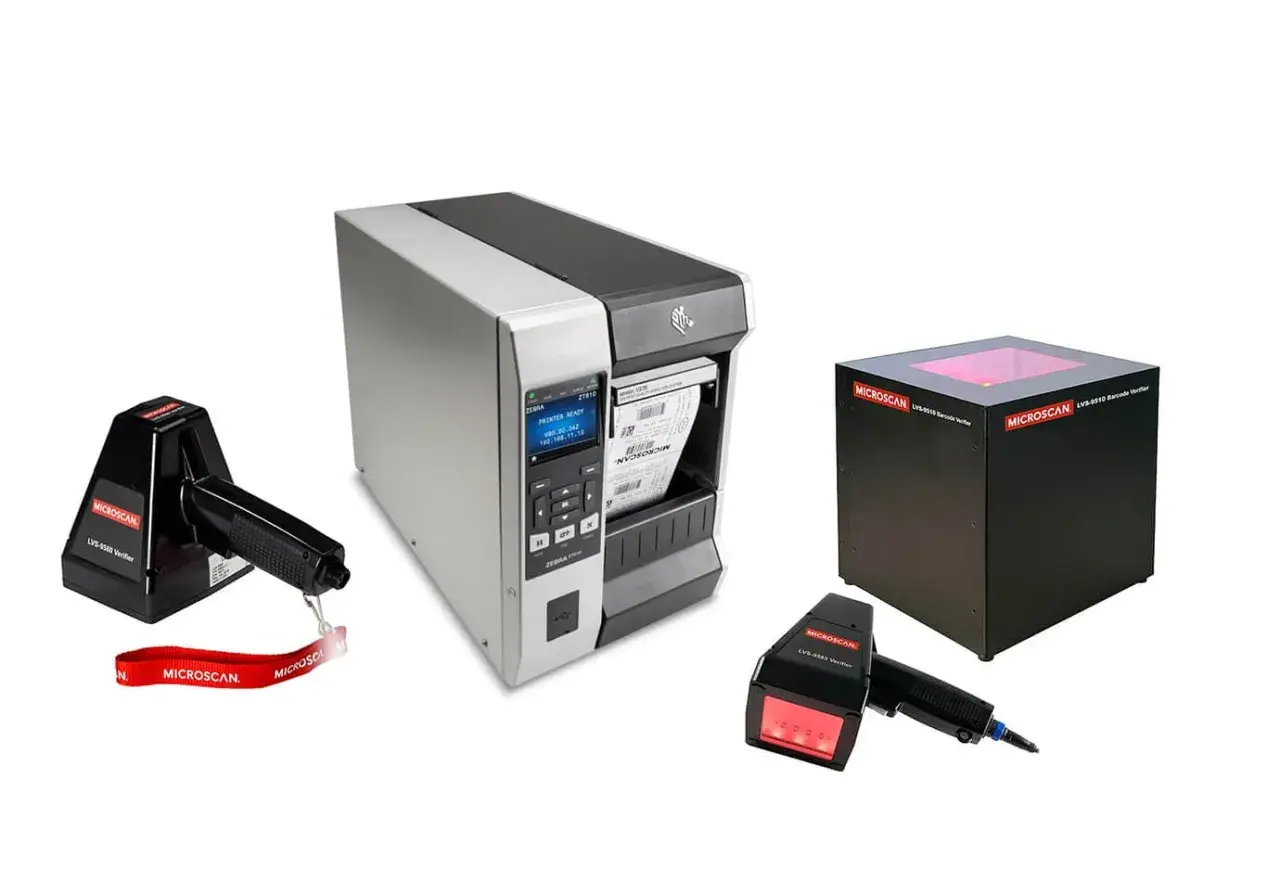
Microscan was folded into Omron in 2017, and the current portfolio still reflects that code-reading heritage. What I see today is a practical mix of hardware and software: fixed-mount barcode readers for conveyor and machine-mounted inspection, handheld readers for operator-driven workflows, barcode verifiers for print quality control, and configuration tools for more complex setups.
That distinction matters because these products do different jobs. A reader confirms that a code can be captured quickly and reliably. A verifier checks whether the code is printed well enough to meet a standard. Software ties the whole thing together when a project needs job changes, device setup, or machine-vision logic. If a vendor treats all of those as the same box, I would be cautious.
In practice, the line is strongest where traceability has to be both fast and repeatable: packaging, electronics, warehousing, logistics, and regulated production. That leads directly to the next question, which is less about hardware and more about who should supply and support it.
Which vendor channel makes sense in the UK
In the UK, I would separate vendors into four useful channels rather than shopping them as if they were interchangeable. Direct Omron contact is best when the project is complex, lifecycle-sensitive, or likely to expand later. An authorised distributor is often the fastest route for replacement stock, routine purchases, and smaller orders. A systems integrator becomes the right choice when the reader is only one part of a larger machine or production-line project. A specialist traceability vendor is useful when verification, print quality, or legacy replacement is the real headache.
| Vendor channel | Best for | Strengths | Trade-offs |
|---|---|---|---|
| Direct Omron UK | Standardisation, multi-site rollouts, difficult applications | Deep product knowledge, stronger escalation path, clearer lifecycle answers | Quotation and approval cycles can be slower than a stock-first distributor |
| Authorised distributor | Replacement buys, urgent orders, routine replenishment | Local buying process, faster procurement, often better stock access | Engineering depth varies, especially on unusual code or lighting problems |
| Systems integrator | New machine builds, line upgrades, custom automation | Application engineering, commissioning, integration with PLCs and controls | Higher project cost, and the hardware choice may be constrained by the integrator’s stack |
| Specialist traceability vendor | Verifiers, compliance jobs, mixed legacy estates | Niche expertise, better comparison across brands, good for print-quality problems | May not cover the whole automation project end to end |
How I compare vendors before I ask for a quote
I do not start with price. I start with evidence. The best supplier will ask for the same things I would: sample labels, code images, line speed, distance to target, ambient light, PLC details, and the reason the current setup is failing. If a vendor jumps straight to a part number without asking for that context, they are selling inventory, not solving a problem.
- Application fit - They should explain why a fixed reader, handheld unit, or verifier is the right tool, not just the brand.
- Sample testing - They should be willing to test your worst-case labels, not only the easy ones.
- Lifecycle clarity - They should confirm whether the model is current, legacy, or due for replacement, and what the successor path looks like.
- Software compatibility - They should state which configuration tools or vision software the unit expects and whether your existing jobs can migrate cleanly.
- Support model - They should define who handles commissioning, troubleshooting, and replacement parts after delivery.
- Response speed - They should tell you how long it takes to get an answer, a demo unit, or an escalation if the line is down.
One thing I always check is whether the vendor understands the difference between a reader and a verifier. Readers are about decode success. Verifiers are about print quality and standards compliance. That is a small distinction on paper and a very expensive one on a regulated production line. From there, the actual product family becomes much easier to narrow down.
The product families most buyers end up choosing
Once the vendor question is under control, the product question usually resolves into a few repeatable choices. The names matter less than the role each family plays on the line, so I prefer to compare them by application rather than by catalogue language.
| Family | Typical role | Best fit | What to watch |
|---|---|---|---|
| Fixed-mount readers such as MS-3, MicroHAWK V330, V420, and V430 | Automatic reading of 1D, 2D, and direct part mark codes | Conveyors, packaging lines, electronics assembly, and compact machine spaces | Code size, field of view, working distance, and lighting usually decide the outcome more than the brand name |
| Handheld readers such as V460 and V410-H | Operator scanning and mixed manual workflows | Warehousing, kitting, maintenance, and situations where mobility matters | Make sure the reader is comfortable in the operator’s hand and robust enough for the floor |
| Barcode verifiers such as LVS-9510, LVS-9580, and LVS-9585 | Checking print quality against ISO and industry requirements | Regulated packaging, labels, and direct part mark inspection | Verification is not the same as reading; it measures whether the code is printed well enough to be trusted |
| Software such as AutoVISION | Setup, inspection logic, and job management | OEMs and plants that want a clearer setup path or more flexible configuration | Version compatibility and migration planning matter, especially on older installs |
There are a few details here that are worth calling out. The MS-3 is a good example of a compact fixed reader that still offers serious industrial capability, including an IP54 enclosure and scan speeds from 300 to 1000 decodes per second. The V430 family is better suited to rugged 1D, 2D, and DPM jobs, while the verifier line is aimed at standards-driven environments where print quality itself is part of the acceptance criteria. That naturally brings software and integration into the picture.
Software and integration are where good quotes become good projects
One reason I pay attention to software is that the wrong tool can turn a good reader into a frustrating one. Omron’s AutoVISION platform is positioned for basic to medium machine-vision tasks, and it matters because many barcode projects are really workflow projects with a scanning component. If the setup path is awkward, the line team ends up avoiding the feature set they paid for.
Compatibility is another detail that gets missed. In the current ecosystem, you will see support tied to MicroHAWK hardware and to machine-vision interfaces such as GigE Vision and USB3 Vision. That is useful if the project has to live inside an existing automation standard. It also means the vendor should be able to explain job migration, firmware expectations, and what happens if you later add a second reader or a verifier station.
- Lighting - Poor lighting is the hidden reason many barcode jobs fail, especially on reflective packaging or curved surfaces.
- Mounting space - A compact reader can still fail if the viewing angle is wrong or the bracket leaves no room for adjustment.
- Code quality - If the code itself is weak, a better reader helps only up to a point; a verifier or print-process fix may be the real answer.
- Job change speed - Plants with frequent product changes need a setup path that operators can actually use.
- Legacy migration - Older Microscan installations can be perfectly usable, but the upgrade path must be checked before parts disappear from stock.
When software, optics, and mounting are aligned, the vendor conversation becomes much simpler. The last step is turning that into a procurement checklist that a UK operations team can actually use.
A practical buying checklist for UK operations
If I were buying into this line for a UK site, I would ask the vendor for five things before approving the order. First, I would want sample testing on my real labels or parts, not synthetic examples. Second, I would want the exact model status and the replacement path in writing. Third, I would want support responsibilities spelled out, especially if the project includes commissioning or operator training. Fourth, I would want confirmation of software version compatibility. Fifth, I would want a clear view of lead time and spare-part availability, because a cheap quote is not cheap if the line waits three weeks for a missing accessory.
- Send the worst-case samples, not just clean artwork.
- Share line speed, code size, working distance, and lighting conditions.
- Ask for lifecycle status and successor options before you commit.
- Confirm whether the vendor will support installation, setup, and tuning.
- Check how the product will be serviced if a unit is replaced in two or three years.
I also think UK teams should be stricter about ownership than they often are. If the vendor cannot tell you who handles the problem after delivery, you do not have a supplier yet; you have a box seller. That distinction is where a lot of avoidable downtime starts.
The detail that separates a usable supplier from a merely cheap one
The best vendor is the one that can prove performance on your actual code, explain the lifecycle of the exact model you are buying, and stay available after commissioning. That is especially true with traceability hardware, where the real cost is rarely the scanner itself; it is the time lost when the line does not read reliably or the software job is hard to maintain.
For most UK buyers, the smart approach is simple. Start with a vendor that understands the application, insist on sample testing, and choose the product family that matches the job rather than the quote template. If the supplier can do that, the Omron traceability portfolio is strong enough to support both new projects and legacy replacements without forcing unnecessary complexity.
If I were standardising a site, I would pay more for that combination before I would pay less for a box alone. That is the difference between a purchase order and a working traceability system.
