
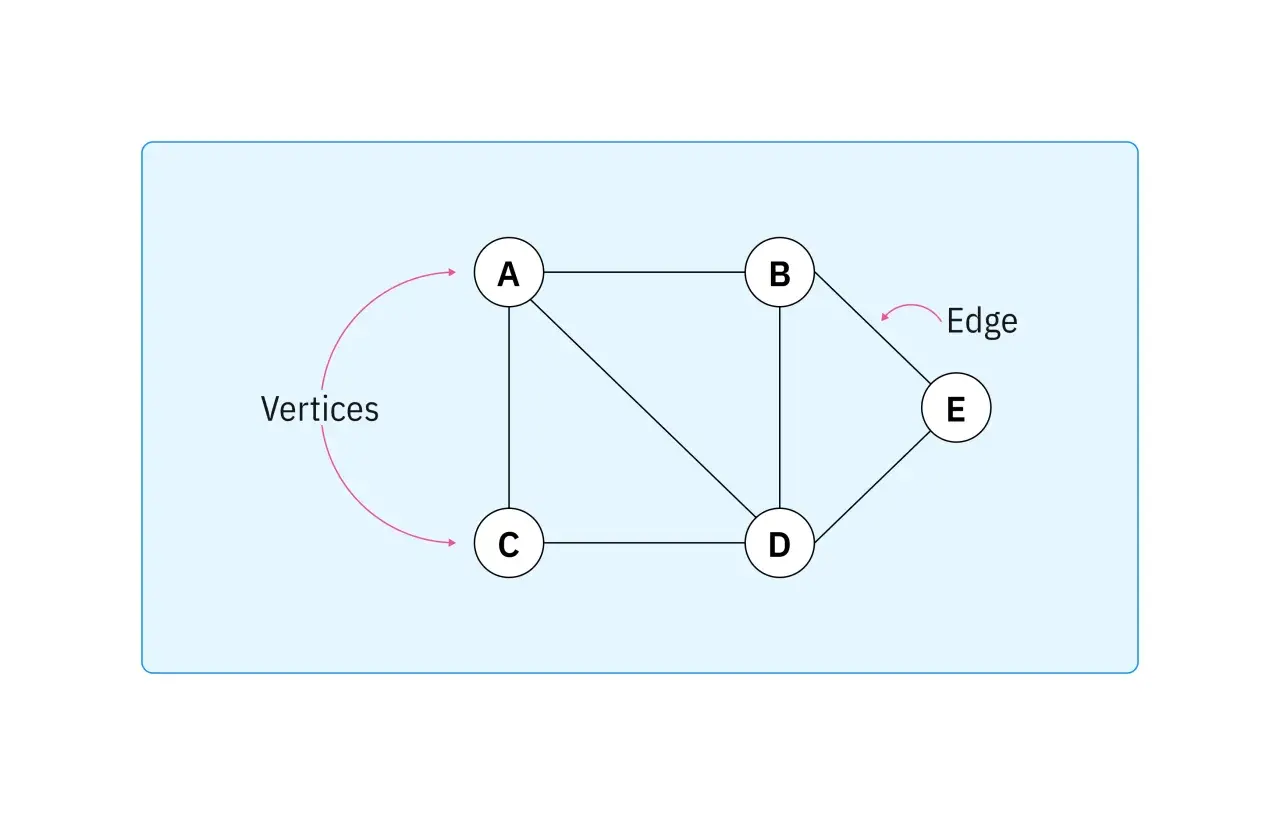
The plain-English answer to what is a node in IT is simple once you strip away the jargon. A node is any connected point in a network that can send, receive, store, or forward data, which means the term covers everything from laptops and printers to routers, switches, sensors, and gateways. In practice, I care less about the label and more about the role the node plays in the traffic path.
A node is any connected point that can exchange data in a network
- End devices such as PCs, HMIs, PLCs, cameras, and printers are nodes.
- Networking gear such as switches, routers, firewalls, and gateways is also made of nodes.
- A host is a type of node, but not every node is a host.
- In industrial and IoT environments, edge nodes often matter as much as central servers.
- The real value of the term is in understanding topology, traffic flow, and failure points.
What a node actually means in networking
In networking language, a node is a connected point on the network that participates in communication. Cisco and AWS both describe nodes as devices or points that can send, receive, or forward data, and that broad definition is the one I use when explaining the term to non-specialists.
The useful distinction is this: a host is a node with its own network address and application role, while an intermediary node may exist mainly to move traffic. A laptop is a host, a router is not a host in the usual sense, but both are nodes because both sit inside the communication fabric.
Topology is just the map of how those nodes and links fit together, so the term matters whenever you need to understand traffic flow, fault domains, or where a connection actually breaks. That broader view becomes much more useful when you start classifying the different kinds of nodes.
The main types of nodes you will meet
Not every node does the same job. In real networks, I usually group them by function, because that tells you far more than the brand name on the chassis.
| Node type | What it does | Examples | Why it matters |
|---|---|---|---|
| Endpoint node | Creates or consumes data | Laptops, HMIs, printers, sensors, cameras, PLCs | Usually where the work starts or ends |
| Intermediary node | Forwards, filters, or routes traffic | Switches, routers, firewalls, gateways | Controls how data reaches its destination |
| Service node | Provides shared services to others | Servers, NAS devices, time servers, authentication servers | Supports the rest of the network rather than a single user |
| Edge node | Processes data near where it is generated | Industrial gateways, edge servers, local analytics boxes | Reduces latency and keeps critical functions local |
| Virtual node | Runs as software rather than dedicated hardware | VMs, container workers, cloud instances | Common in modern hybrid networks and cloud deployments |
That mix is what makes modern networks flexible, but it also makes them easier to misread if you assume a node must be a physical box. Once you start thinking in roles, the path a packet takes becomes much easier to follow.

How nodes move data across a network
A network is not just a collection of devices. It is a set of nodes linked together so that data can travel from one point to another. The path may be simple, or it may cross several intermediary nodes before it reaches the destination.
- The source node creates data, usually as a packet or frame.
- The first connected device checks where the data should go next.
- Switches move traffic within a local network, while routers choose the next network hop.
- Gateways can translate between different protocols or network domains.
- The destination node receives the data and passes it to the correct application or service.
A packet is a chunk of network data, while a frame is the local delivery wrapper on an Ethernet or Wi-Fi segment. I keep that distinction in mind because the forwarding decision can happen at different points depending on the layer of the network involved.
The practical point is that every extra hop adds a little more delay, more processing, and more opportunity for failure. In a quiet office network that may be trivial; on a production line, it can decide whether a control loop stays stable or starts drifting. That is why node placement matters just as much as node count.
Why nodes matter so much in industrial automation and IoT
In industrial automation, nodes are not abstract objects on a diagram. They are sensors on a machine, PLCs running logic, HMIs used by operators, gateways bridging OT and IT, and edge servers filtering data before it ever leaves the plant. I see the biggest problems when teams treat those devices like ordinary office endpoints and forget that some of them have timing, safety, or availability requirements.
A few examples make the difference obvious:
- Sensors are usually endpoint nodes that report temperature, pressure, vibration, or position.
- PLCs are programmable logic controllers that read inputs, execute control logic, and drive outputs in real time.
- HMIs are human-machine interfaces, the screens operators use to monitor and control equipment.
- SCADA systems stand for supervisory control and data acquisition, which means they collect plant data and present it at a supervisory level.
- Industrial gateways are intermediary nodes that may translate between protocols such as Modbus, PROFINET, and Ethernet/IP, which are the rules devices use to talk to each other.
- Edge servers are service nodes that can run analytics, buffering, or local machine learning close to the equipment.
In these environments, the value of a node is not just connectivity. It is predictable behaviour under load, clear recovery when something fails, and enough local intelligence to keep essential processes running. That is the point where networking becomes operational, not just technical.
The misunderstandings that cause weak network designs
There are a few mistakes I see again and again, and they usually come from treating the word node too casually.
- Only computers are nodes is false. Routers, switches, printers, sensors, and gateways can all be nodes.
- Node and host are identical is also false. Every host is a node, but some nodes only forward traffic.
- More nodes always mean more complexity is incomplete. More nodes do increase complexity, but segmentation and good addressing keep that manageable.
- A node must be physical hardware is outdated. Virtual machines and cloud instances can be nodes too.
- Every node matters equally is rarely true. A failed gateway or PLC usually hurts more than a failed user laptop.
Once you stop flattening everything into the same category, troubleshooting gets faster. You start asking the right question: which node is responsible for this part of the traffic path, and what happens if it disappears?
What I would check before adding another node to a growing network
When a network grows, the first mistake is usually adding devices before the structure is ready. I would check four things before expanding any node-heavy environment:
- Addressing - Every node needs a clean IP address, naming, and inventory scheme so it can be found and managed quickly.
- Segmentation - VLANs, or virtual LANs, subnets, and security zones keep traffic from spilling everywhere and make failures easier to contain.
- Resilience - Power, redundant links, local buffering, and failover matter more once nodes become critical to production.
- Observability - Logs, SNMP, a standard monitoring protocol used to read device status, telemetry, and asset records should tell you what each node is doing before something breaks.
I also pay attention to protocol fit. A well-designed network can still behave badly if the node mix includes devices that talk slowly, translate poorly, or depend on a single gateway for everything. That is why good network design is less about collecting devices and more about assigning each node a role that the rest of the system can support.
The practical takeaway for node-heavy networks
If you remember one thing, make it this: a node is not just a device, it is a functional point in the network. That is why the term is so useful in IT, networking, automation, and IoT alike. It lets you think about where data starts, where it is transformed, where it is forwarded, and where it finally ends up.
For me, the best networks are the ones where every important node has a clear job, a clear failure mode, and a clear place in the topology. Once you can describe those three things, the network is usually easier to scale, easier to troubleshoot, and much less likely to surprise you when the load increases.
