
An Ethernet port is the physical network interface that lets a device send and receive data over a wired connection. The ethernet port definition is straightforward, but the practical details matter: speed, cabling, PoE support, and link stability all change how the connection behaves in real life. In industrial automation, smart manufacturing, and IoT systems, that difference is not academic; it decides whether a PLC, camera, access point, or gateway stays reliably online.
The essentials at a glance
- An Ethernet port is a physical socket for a wired network, not a TCP or UDP port number.
- Most ports use RJ45 copper cabling, though fibre and industrial variants are common in some environments.
- Speed, duplex mode, auto-negotiation, PoE, and cable quality are the main traits that affect performance.
- Common copper runs are typically designed around a 100-metre limit, depending on the standard and the installation.
- In factories and IoT deployments, wired Ethernet stays popular because it is predictable, scalable, and easy to power when PoE is available.

What an Ethernet port actually is
I treat an Ethernet port as the doorway between a device and the wired network. It is the socket on a laptop, controller, switch, router, camera, printer, or gateway that accepts a cable and exposes the device's network interface to the rest of the LAN.
That matters because the port itself does not create connectivity magic; it simply provides the physical Layer 1 and Layer 2 handoff. Once the link is up, the device and the switch exchange Ethernet frames, usually identified and forwarded by MAC address.
It is also important to separate the physical port from a TCP or UDP port number. One is a connector you can touch, the other is a logical number used by software. Mixing those two up leads to poor troubleshooting, especially when someone says a port is "closed" without saying whether they mean the cable socket or a firewall rule.
Once that distinction is clear, the next question is how the connection actually moves data.
How the connection works under the hood
Under the hood, Ethernet is a set of rules for moving frames across a wired link. Cisco describes Ethernet as part of IEEE 802.3, and Intel's cabling guidance shows the practical side of that standard: RJ45 copper links use twisted-pair cabling, and common Fast Ethernet and Gigabit deployments typically rely on Cat 5 or Cat 6 cable.
When you plug in a cable, the port negotiates link speed and duplex with the other end. In most modern networks that means full duplex, so the device can send and receive at the same time instead of taking turns. Link and activity LEDs give you a quick visual check, which is why I always look at the lights before I touch anything else.
The useful part is that Ethernet usually fails in understandable ways. If the cable is wrong, the link drops or falls back to a lower speed. If negotiation is off, you may still get connectivity, but not the throughput you expected. That is far easier to debug than a wireless link that looks fine but is being eaten by interference.
Once you understand the handshake, the next layer is the set of characteristics that actually determine how good the port is.
The characteristics that matter most
When I evaluate a port, I focus on a short list of characteristics that affect real performance more than marketing labels do.
| Characteristic | What it means | Why it matters |
|---|---|---|
| Connector type | Usually RJ45 on copper, but industrial and fibre variants also exist | It determines what cable or transceiver you can use |
| Link speed | Commonly 10/100/1000 Mb/s, with multi-gig and 10 Gb/s on newer gear | It sets the maximum practical throughput of the connection |
| Duplex | Usually full duplex on modern links | It lets traffic move in both directions at once |
| Auto-negotiation | The port and connected device agree on speed and duplex | It prevents many avoidable mismatches |
| PoE support | Power can travel over the same copper cable | Useful for cameras, access points, sensors, and IoT endpoints |
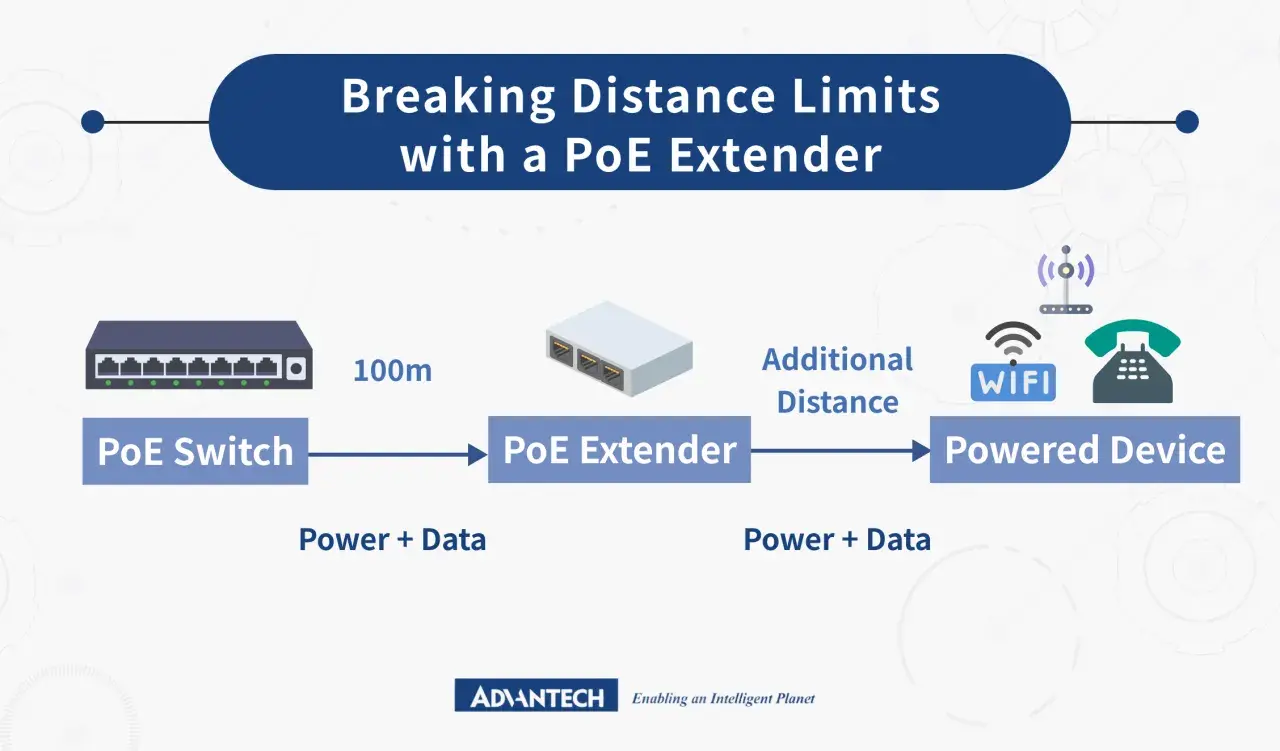
| Cable distance | Common copper runs are typically capped at 100 metres | Longer runs need fibre, extenders, or a switch closer to the device |
There are a few practical extras worth checking. PoE can remove a separate power supply, which simplifies installation, but it only works when the switch or injector and the endpoint support the same PoE standard. Cisco's PoE guidance is useful here too: power can run over copper Ethernet cabling, but PoE does not add Ethernet data capacity.
If you are working in a plant room or machine cabinet, the port's temperature tolerance, shielding, and locking style can matter as much as raw speed. That is where the next question appears: which port type is actually the right one for the job?
Common port types and speeds you will see
Not every Ethernet port looks the same, and the difference is more than cosmetics. The port type tells you a lot about the environment it was designed for, the cabling it expects, and the ceiling on performance.
| Port type | Typical use | What to expect |
|---|---|---|
| 10/100/1000 RJ45 | Most office PCs, printers, cameras, and older switches | Simple copper connection, widely compatible, usually the baseline option |
| Multi-gig RJ45 | Wi-Fi 6/6E access points, modern workstations, edge devices | Supports 2.5G, 5G, or 10G on the same style of copper port when the hardware allows it |
| SFP / SFP+ | Switch uplinks and fibre runs | Uses a transceiver module; useful when distance, EMI, or bandwidth push beyond copper |
| Industrial Ethernet connector | Rugged machines, PLC cabinets, transport systems | Often sealed or locking, built for vibration, dust, and harsher conditions |
That last line matters more in industrial automation than in a desk-side network. In a factory, I care less about whether the port is fashionable and more about whether it survives vibration, keeps a clean link in a noisy electrical environment, and remains serviceable for the maintenance team.
Intel's current product lines include controllers up to 2.5GbE, and Cisco ships multi-gig RJ45 ports that support 2.5G, 5G, and 10G on selected hardware. The trend is clear: multi-gig is no longer an edge case. It is becoming the normal answer when a 1GbE link starts to bottleneck Wi-Fi, cameras, and local edge workloads.
With the hardware types in mind, the next source of confusion is not technical at all. It is the language people use.
What people often confuse it with
This is the section I wish more people read before they start troubleshooting.
| Term | What it is | Why the distinction matters |
|---|---|---|
| Ethernet port | Physical network socket on a device | It is where the cable plugs in and where link negotiation happens |
| TCP/UDP port | Logical number used by software services | It affects firewall rules and application access, not the cable socket |
| USB-to-Ethernet adapter | Accessory that adds a network interface | Useful when a device lacks a native port, but it is not the same as built-in hardware |
| Wi-Fi | Wireless network technology | It can provide internet access, but it is not an Ethernet port and does not use a cable |
I also see confusion between "Ethernet" and "internet". An Ethernet port can connect you to a local switch with no internet access at all. The port gives you a network link; whether that link reaches the internet depends on routing, addressing, and upstream services.
Once that is clear, the real value of a wired port becomes easier to see in industrial and IoT settings.
Why it still matters in industrial automation and IoT
For industrial automation and IoT, Ethernet remains popular for the same reasons engineers keep returning to it: predictable behaviour, familiar tooling, and easy scaling. A PLC, HMI, vision camera, industrial PC, or gateway connected by wire usually gets steadier latency than a wireless equivalent, and steadier latency is often what keeps the line usable rather than merely connected.
There is also a practical installation reason. Power over Ethernet can feed devices such as access points, cameras, and some sensors from the same cable that carries data, which reduces cabinet clutter and separate power runs. In machine environments, that simplifies maintenance, although I still treat PoE as a design decision rather than a default assumption, because power budget and compatibility have to line up.
In harsher sites, the physical details become more important. Vibration, electromagnetic noise, temperature swings, and dust can turn a normal-looking port into a support problem if the connector, cable, or switch is not rated for the environment. That is why industrial Ethernet hardware often looks a little less elegant than office gear: it is built for survival, not showroom appeal.
When I see Ethernet used well in a plant, it is rarely because one port is magical. It is because the port, cable, switch, and power plan were specified together, not treated as separate afterthoughts. That leads to the final point: the small spec checks that save time and money.
The small spec details I never ignore
If I had to reduce Ethernet port selection to three checks, it would be these: match the port speed to the real workload, confirm the cable and distance are within the standard, and verify PoE and environment ratings before the hardware reaches the cabinet.
- Choose more than 1GbE when cameras, access points, or edge compute can saturate the link.
- Use fibre or a nearer switch when 100 metres is not enough or electromagnetic interference is severe.
- Check the PoE budget, not just PoE presence, because power class decides whether the endpoint actually starts up.
- Look at the link LEDs first when a port seems dead; they usually tell you whether the fault is physical, negotiated, or somewhere higher up the stack.
That is the practical version of the definition: the port is simple, but the details around it decide whether the network feels solid or fragile. If you treat those details as part of the port, not an afterthought, you will make better design and troubleshooting decisions.
